Streamlined printing for legacy workflows
Samsung Universal Print Driver serves as a practical printer driver, simplifying printing across multiple devices with a single installation. This free program focuses on consistency, convenience, and reducing driver clutter rather than offering innovative features, making it useful for productivity, office suites, and shared work environments.
Top Recommended Alternative

Samsung Universal Print Driver remains relevant for users managing older or mixed printer setups where unified control outweighs customization. The program provides reliable usability, straightforward setup, and dependable performance, making it suitable for routine printing tasks in professional and institutional settings while balancing simplicity with consistent tools support for ongoing workflow
Unified driver, practical results
Samsung Universal Print Driver excels in centralized driver management, enabling multiple printer models to operate under a single installation. This reduces setup time, simplifies maintenance, and supports shared devices in offices. Compatibility is strongest with supported models, providing consistent output, though the trade-off is limited access to device-specific features, which may be important for users who require advanced printing options or fine-tuned control for specialized tasks.
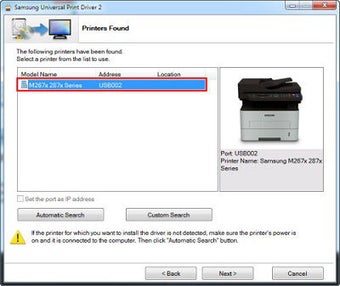
For daily use, the program offers a clean, user-friendly interface that emphasizes simplicity over extensive customization. Printer discovery and selection are smooth and intuitive, making it ideal for non-technical users. While advanced settings are limited compared to dedicated drivers, this straightforward approach ensures reliability and reduces errors, though those seeking detailed configuration or specialized options might find the program’s capabilities somewhat restrictive over time.
The tool delivers stable output for common documents, including text, spreadsheets, and basic graphics, ensuring dependable performance across supported devices. Updates primarily focus on compatibility fixes and stability improvements rather than adding new features. While this reinforces reliability for routine use, it highlights the program’s role as a maintenance-oriented solution, rather than a feature-rich, fully customizable platform for modern or complex printing workflows.
Practical printing without complexity
Samsung Universal Print Driver proves effective as a reliability-focused printing solution for environments that prioritize simplicity, consistency, and minimal maintenance. This review highlights its strengths in unified driver management and stable performance, balanced against limited customization and advanced feature depth. While alternative drivers may provide richer controls, the program remains a practical choice for organizations emphasizing ease of use, workflow stability, and long-term compatibility.